Fox Limber 3D: The Creative Font That Pops Off the Page
Every designer hits a point where flat text just doesn't cut it. You’re working on a greeting card, a social media post, or a party invitation, and the standard sans serif font feels lifeless. You want depth, personality, and a sense of playfulness, but adding 3D effects manually is time-consuming and often looks clunky. This is exactly the problem that Fox Limber 3D solves. It is a premium font designed to inject immediate depth and character into your projects without requiring advanced technical skills. If you are looking to create cute greeting cards that express affection or eye-catching social media posts that stop the scroll, this typeface is a powerful addition to your design assets.
The Personality and Visual Style of Fox Limber 3D
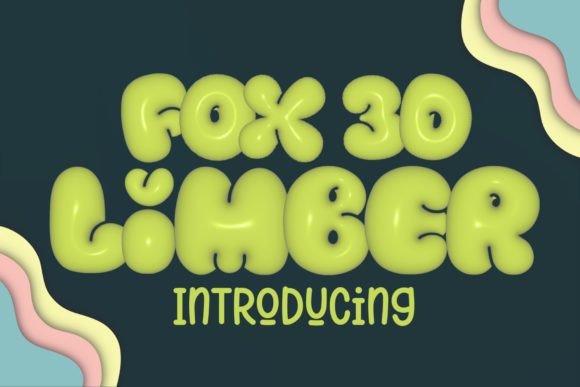
At its core, Fox Limber 3D is a color font, but that description barely scratches the surface of its aesthetic. It blends the organic warmth of a handwritten font with a playful, cartoonish depth. The letters feature soft, rounded edges and a slight slant that mimics natural handwriting, but the defining feature is the "limber" 3D extrusion. It doesn't look like a harsh, geometric shadow; instead, the depth feels soft and tactile, almost like puffy stickers or clay lettering.
This visual style falls into the category of display fonts. You wouldn't use it for body copy in a novel or a corporate report. Its personality is inherently joyful, youthful, and energetic. The "cute" factor is high, making it an ideal choice for projects targeting family audiences, children’s products, or anyone who appreciates a whimsical aesthetic. However, because it is a modern typography solution, it retains a level of sophistication that prevents it from looking childish. It feels authentic, bridging the gap between a casual script font and a polished graphic element.
Real-World Applications: Where Fox Limber 3D Shines
The true value of any creative font lies in its application. Fox Limber 3D is versatile enough to span various mediums, but it truly excels in environments where visual impact is the priority. For social media graphics, this font is a game-changer. Instagram stories, TikTok overlays, and Facebook event headers demand attention instantly. The built-in color and depth of Fox Limber 3D ensure your headlines stand out against busy backgrounds or video content.
Beyond the digital screen, this typeface translates beautifully into print design. If you are a crafter or a small business owner selling on platforms like Etsy, you know the importance of packaging design. Imagine using Fox Limber 3D on product hang tags, thank-you cards, or sticker sheets. It adds a handmade, artisanal feel that customers love. It is also perfect for stationery art and party supplies—think birthday banners, cupcake toppers, and custom invitations. The font carries the design, often eliminating the need for complex illustrations to fill the space.
Brand Identity and Consistency
For entrepreneurs and bloggers, building a recognizable brand identity is crucial. If your brand voice is friendly, approachable, and fun, Fox Limber 3D can become a cornerstone of your visual strategy. Using it consistently across your logo design variations, email headers, and marketing materials creates a cohesive look. It signals to your audience that your brand is creative and detail-oriented. However, it is important to maintain balance. Because this font has a strong personality, it should be used for headlines and key phrases rather than long paragraphs to maintain readability and professionalism.
Technical Mastery: Customization and Workflow
One of the standout features of Fox Limber 3D is its adaptability through color customization. While the default color palette is vibrant and ready to use, professional designers often need to match specific brand colors. The font package includes an Alphabet Doodle PNG file at 300 DPI, which is excellent for high-resolution printing, but the real magic happens when you know how to manipulate the vector layers in your design software.
The process for changing the font color depends on your software of choice, but it is surprisingly straightforward. It is important to note that because this is a color font, you cannot simply change the color in the character panel as you would with a standard serif font. You must rasterize the text first.
For Adobe Photoshop Users:
Once you have typed out your text using Fox Limber 3D, the workflow is simple. Right-click on the text layer in your layers panel and select Rasterize Type. This converts the editable text into a pixel-based image. Now, to shift the hue, press Ctrl+U (or Cmd+U on Mac) to open the Hue/Saturation dialog box. Check the Colorize box, and then adjust the sliders until you achieve your desired color. This method allows you to match the font perfectly to the rest of your design assets.
For Adobe Illustrator Users:
Illustrator handles this slightly differently to preserve vector quality where possible. Select the text, go to Object > Rasterize. Ensure your resolution is set to High (300 dpi) and the background is Transparent. Once rasterized, navigate to Edit > Edit Colors > Adjust Colors. This menu gives you sliders to modify the color balance, allowing you to preview changes in real-time. This workflow is essential for maintaining the high quality required for professional printing and packaging design.
Choosing the Right Font Pairings
When integrating Fox Limber 3D into a larger project, font pairing is critical. Because Fox Limber 3D is a bold, decorative display font, it needs a counterpart that is quiet and legible. Avoid pairing it with other script fonts or high-impact display fonts, as this will create visual chaos.
Instead, look for a clean sans serif font for your body text. Fonts like Montserrat, Lato, or Open Sans provide the perfect contrast. The geometric simplicity of a sans serif allows the playful curves of Fox Limber 3D to take center stage without competing for attention. If you are going for a slightly softer look, a simple serif font with high readability can also work, particularly for wedding invitations or lifestyle blog headers. The key is to let Fox Limber 3D be the star of the show, using it sparingly for maximum impact.
Licensing and Commercial Use
Before using any font for a client project or commercial product, understanding the licensing is non-negotiable. Fox Limber 3D is a commercial font, meaning you need to purchase the appropriate license for your usage. Whether you are a freelance designer creating assets for a client or a small business owner printing merchandise, ensure your license covers your specific needs. This protects you legally and supports the type designers who create these intricate, high-quality tools. Always review the included styles and read the license agreement to ensure you are compliant, especially when creating physical goods for sale.